
If you’re a frontend developer, everybody tells you to become senior, but no one really explains how. We’ve analyzed over 300 senior frontend engineers across different backgrounds and frameworks and one clear pattern came up. Every single one of them has mastered a set of core frontend mental models.
Most developers can’t even explain four-five of these concepts. That’s exactly why many developers stay stuck at mid-level for years and struggle in frontend interview concepts and system design discussions. If you’re wondering how to become a senior frontend developer, this is exactly where most people get stuck.
But once you understand these mental models, you move closer to becoming a senior frontend developer.
Table of Contents
In this guide on how to become a senior frontend developer, we’ll cover the first five essential concepts you must master.
Critical Rendering Path
The critical rendering path is one of the most important frontend performance optimization techniques and a core concept you must understand if you want to become a senior frontend developer. It defines how the browser goes from HTML, CSS and JavaScript to actual pixels on the screen.
It all starts when the browser receives an HTML file from the server. The browser begins reading the document from top to bottom. While parsing, it discovers external resources like CSS files, JavaScript files and fonts. These resources must be downloaded and processed before rendering can proceed.
CSS is used to build the CSSOM, JavaScript helps construct or modify the DOM and together they form the render tree. Only after this can the browser start painting content.
The browser rendering process step by step includes:
- Style calculation
- Layout (calculating positions)
- Paint (drawing pixels)
- Composite (final display)
The moment users see something on the screen is called the First Contentful Paint (FCP). A key concept here is render blocking resources. CSS and some JavaScript files block rendering because they must be fully processed before the browser continues.
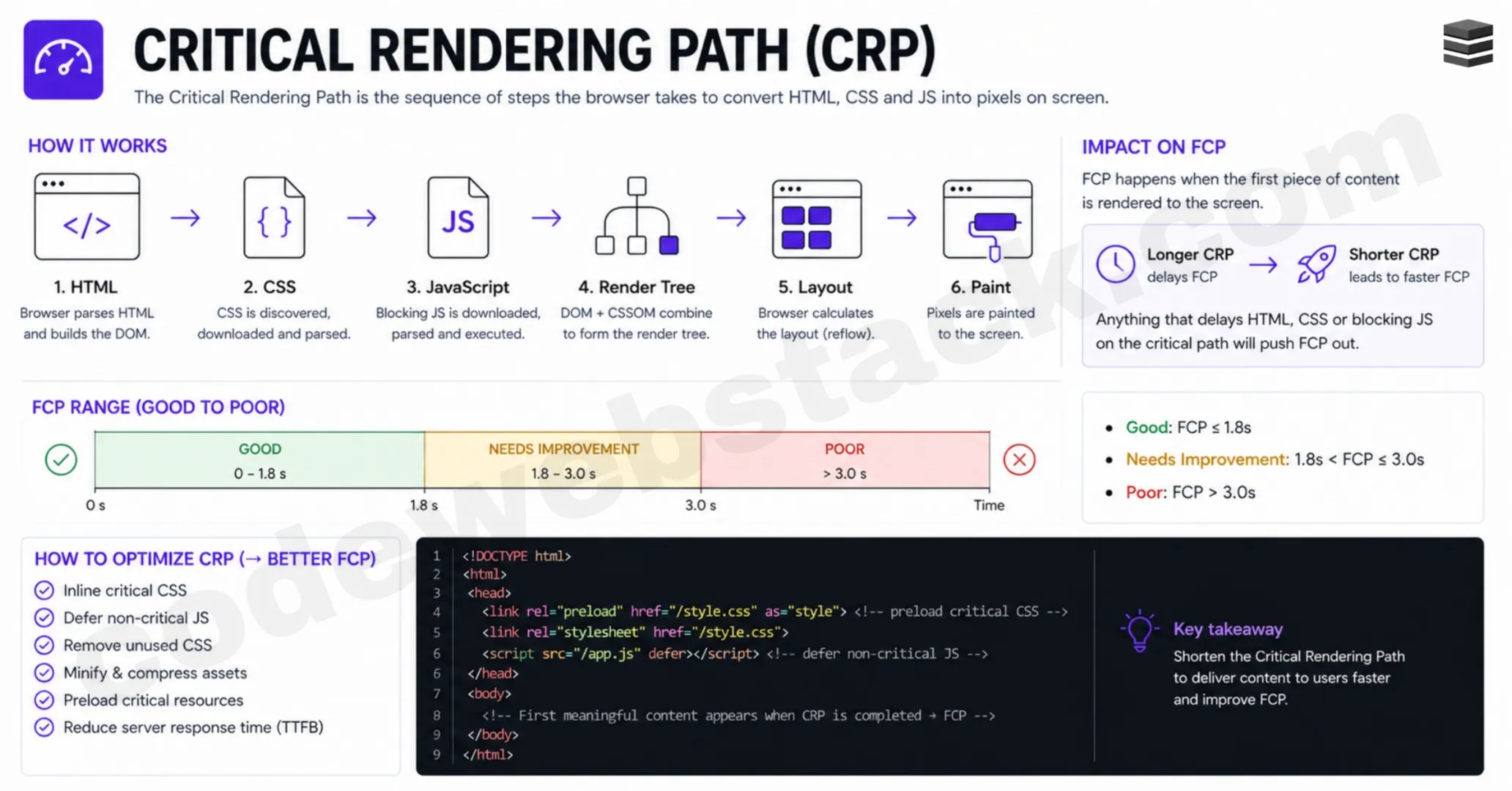
This is why understanding how browser renders a webpage is critical. Instead of jumping into frameworks like React or Next.js, senior developers focus on these underlying browser mechanics first, this is a key step in understanding how to become a senior frontend developer.
Core Web Vitals
Once you understand the critical rendering path, the next step is understanding Core Web Vitals, which are essential frontend performance best practices.
Core Web Vitals are metrics that measure how fast your website loads and how responsive it is. The three main metrics are:
- Largest Contentful Paint (LCP) – measures loading performance
- Interaction to Next Paint (INP) – measures responsiveness
- Cumulative Layout Shift (CLS) – measures visual stability
LCP and CLS are measured during the initial load, while INP focuses on user interactions like clicks and typing.
Think of these metrics as performance benchmarks, similar to how Formula 1 cars are measured based on speed and efficiency. In the same way, websites are evaluated using these metrics.
There is a strong relationship between core web vitals explained and the critical rendering path. As the browser renders content progressively, it identifies the largest visible element (usually an image or large text), which becomes the LCP.
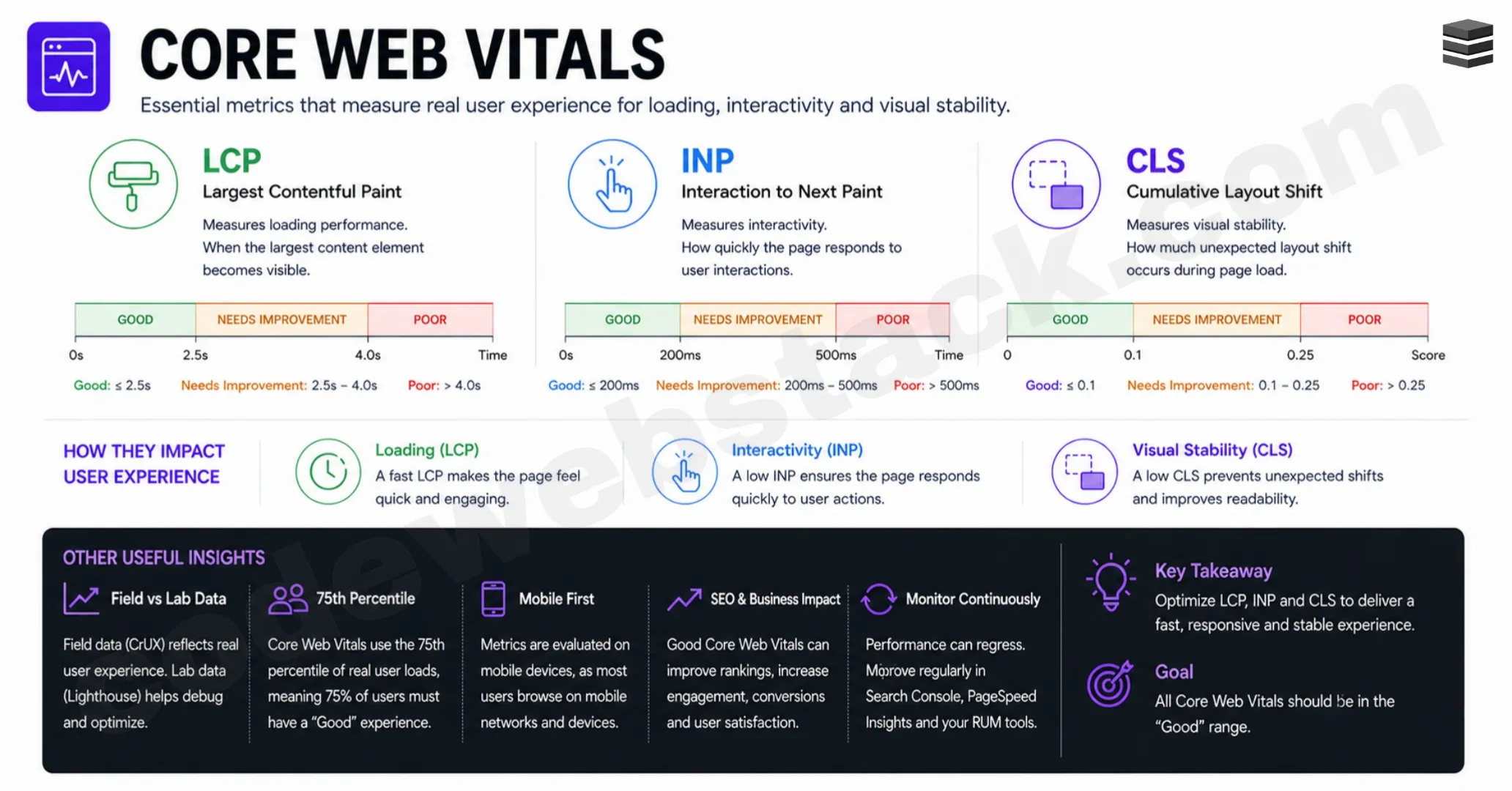
Meanwhile, layout shifts occur when elements move unexpectedly due to late-loading CSS or dynamic content. This directly affects CLS.
INP becomes important after the page loads. When a user interacts with the UI, the time taken for the interface to respond and re-render determines responsiveness.
Understanding these metrics is essential if you truly want to master frontend performance and learn how to become a senior frontend developer.
Also Read: Git and GitHub for Beginners : Complete Step-by-Step Guide
HTTP Caching Explained with Example
To improve performance further, we use HTTP caching, one of the most powerful frontend optimization strategies and an important concept in understanding how to become a senior frontend developer.
Before diving into HTTP caching, understand caching as a general concept. Caching is essentially memoization, reusing the result of a previous operation instead of repeating it.
In web development, this means storing files like CSS, JavaScript or images so that they don’t need to be downloaded again.
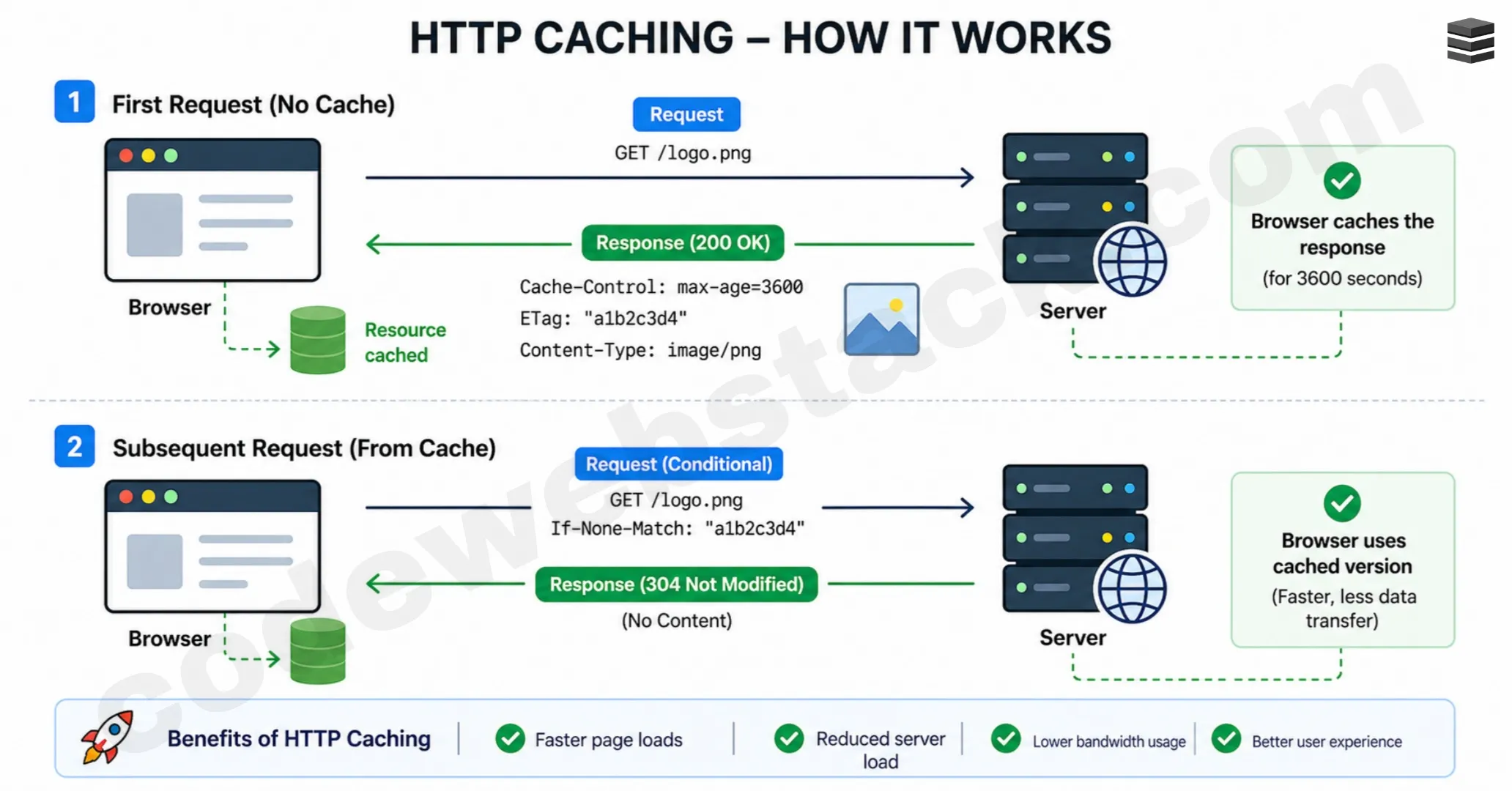
Here’s how HTTP caching explained with example works:
- When a browser requests a file for the first time, it fetches it from the server. If caching is enabled, the file is stored in the browser cache along with a TTL (Time To Live).
- On the next request, instead of going back to the server, the browser uses the cached version, making the website load faster.
- However, cached data cannot stay forever. Once the TTL expires, the browser checks with the server using a mechanism called cache validation, often managed through ETag headers.
- If the file hasn’t changed, the cached version is reused. Otherwise, a new version is downloaded and stored again.
This process significantly reduces network requests and improves performance. Mastering concepts like caching is a big step toward learning how to become a senior frontend developer.
Content Negotiation in HTTP
Another important concept in frontend performance is content negotiation in HTTP, which defines how the client and server communicate about data formats.
When a browser requests a resource, it sends headers (like Accept-Encoding) to inform the server about supported formats. For example, it can request compressed versions of files.
The most commonly used compression algorithms are:
- Gzip
- Brotli (br)
Brotli is generally more efficient and results in smaller file sizes.
Here’s how it works:
- The client requests a resource and specifies that it can accept compressed formats. The server then responds with the most optimized version available. Along with the response, it includes a header like Content-Encoding: gzip or br.
- The browser then decompresses the file before using it.
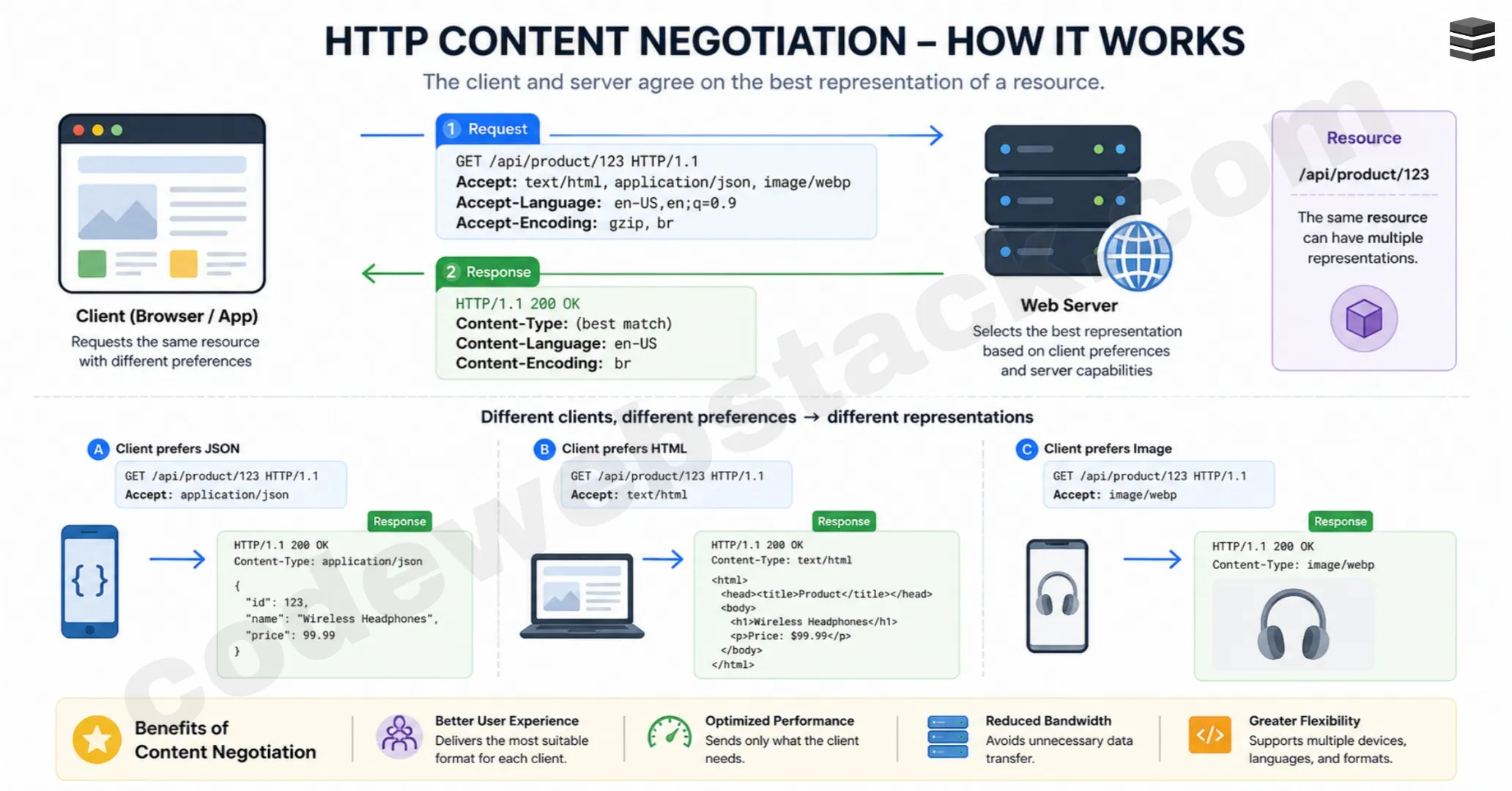
The reason this works is simple, it’s faster to download a smaller compressed file and decompress it than to download a large uncompressed file. Understanding this concept helps improve performance and is another step in mastering how to become a senior frontend developer.
Lazy Loading (JavaScript Example)
The next concept is lazy loading, which is one of the most effective frontend performance best practices and a must-know if you’re serious about learning how to become a senior frontend developer.
The opposite of lazy loading is eager loading, where everything is loaded at once. This increases initial load time and negatively affects performance.
Lazy loading solves this by loading only what is needed when it is needed.
- For example: Images that are not visible on the screen initially can be loaded only when the user scrolls. This reduces unnecessary resource loading during the initial render.
But lazy loading is not limited to images. You can also implement lazy loading JavaScript example using dynamic imports. Traditionally, JavaScript uses static imports, which are bundled at build time and loaded upfront. These often become render blocking resources.
With dynamic imports, JavaScript is loaded at runtime. For example, when a user clicks a button, you can load a module only at that moment. This reduces the size of the initial bundle and improves performance significantly.
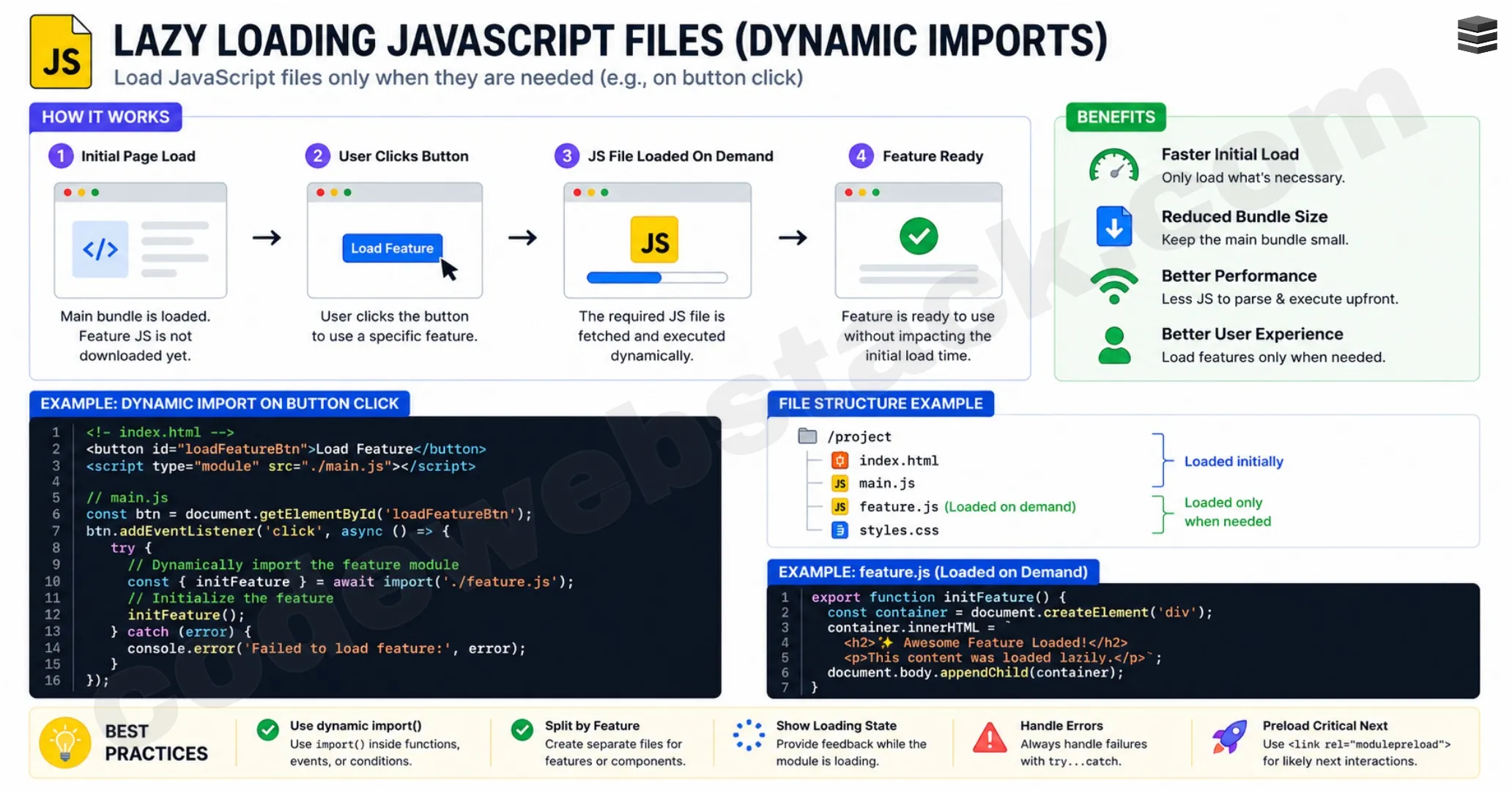
Dynamic imports allow you to:
- Reduce initial load time
- Improve Core Web Vitals
- Optimize resource usage
Understanding concepts like lazy loading and dynamic imports is essential if you want to truly understand how to become a senior frontend developer.
Bundle Splitting
Another important concept to understand if you’re learning how to become a senior frontend developer is bundle splitting.
Traditionally, all your JavaScript code is combined into a single large file (bundle) during the build process. While this makes deployment easier, it creates a major performance issue, users are forced to download the entire bundle even if they only need a small part of it. This directly affects the critical rendering path and increases load time.
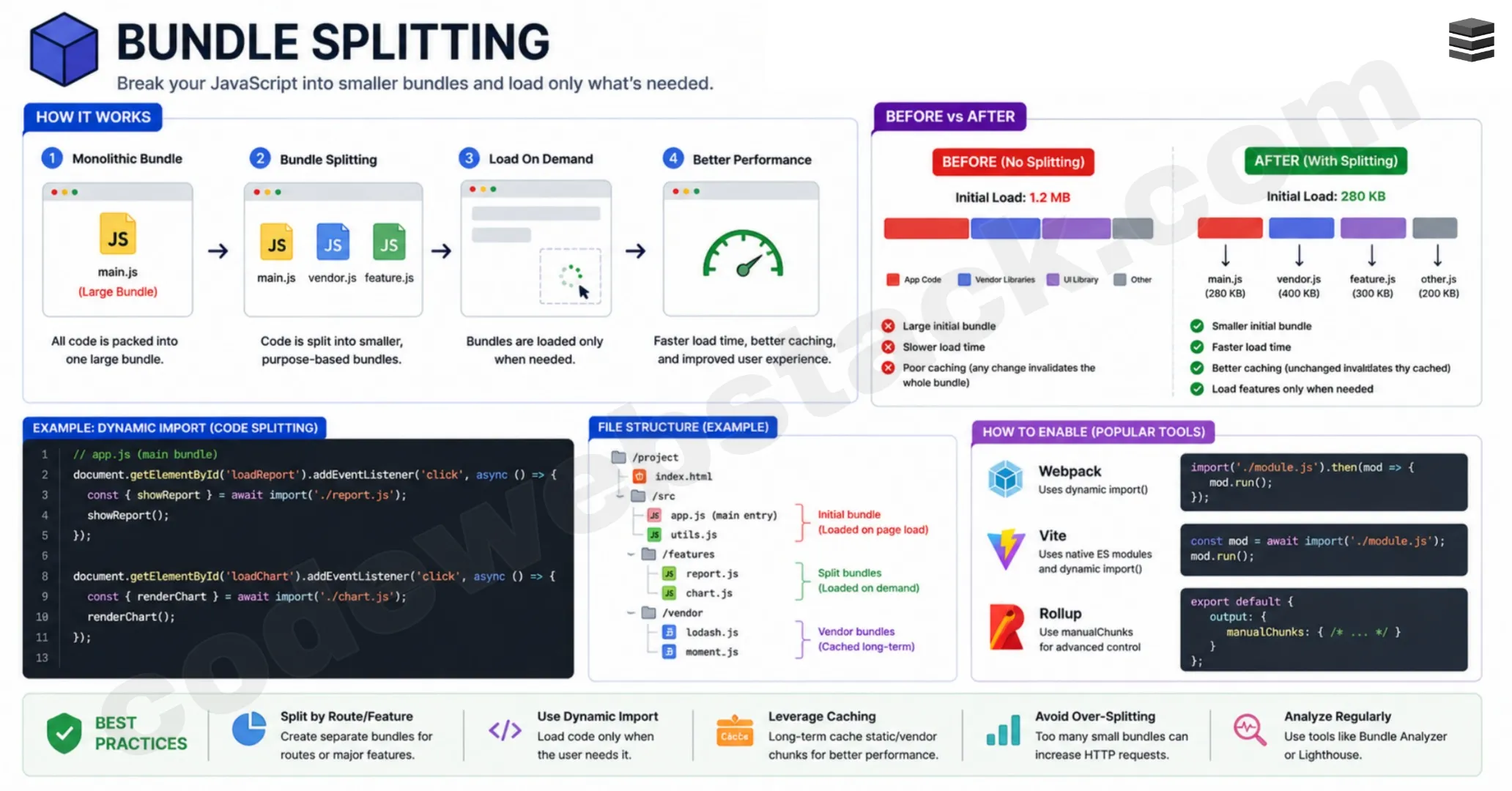
Bundle splitting solves this problem by breaking the application into smaller chunks. Instead of loading everything upfront, only the required code is loaded based on the user’s interaction or route.
- For example: When a user visits a login page, they don’t need the dashboard or settings code. With bundle splitting, only the login-related code is loaded initially.
Modern tools like Webpack, Vite and frameworks like React Router make this process easier by enabling route-based code splitting.
This is one of the easiest yet most impactful frontend performance optimization techniques and mastering it is a key step in understanding how to become a senior frontend developer.
Critical CSS
If you want to go deeper into performance optimization and understand how to become a senior frontend developer, you need to understand critical CSS.
CSS is render-blocking by default. The browser must download and process all CSS before it can render content, because it needs to know how every element should look. This becomes a problem in large applications with huge CSS files.
Critical CSS solves this by focusing only on the styles required for the above-the-fold content, the part of the page visible when it first loads. Instead of loading all styles upfront:
- Critical CSS is inlined directly in the HTML
- Remaining CSS is loaded later (non-blocking)
This significantly improves the First Contentful Paint (FCP) and overall user experience. In real-world applications, tools like Webpack plugins or headless browsers (like Puppeteer) are used to extract critical CSS automatically.
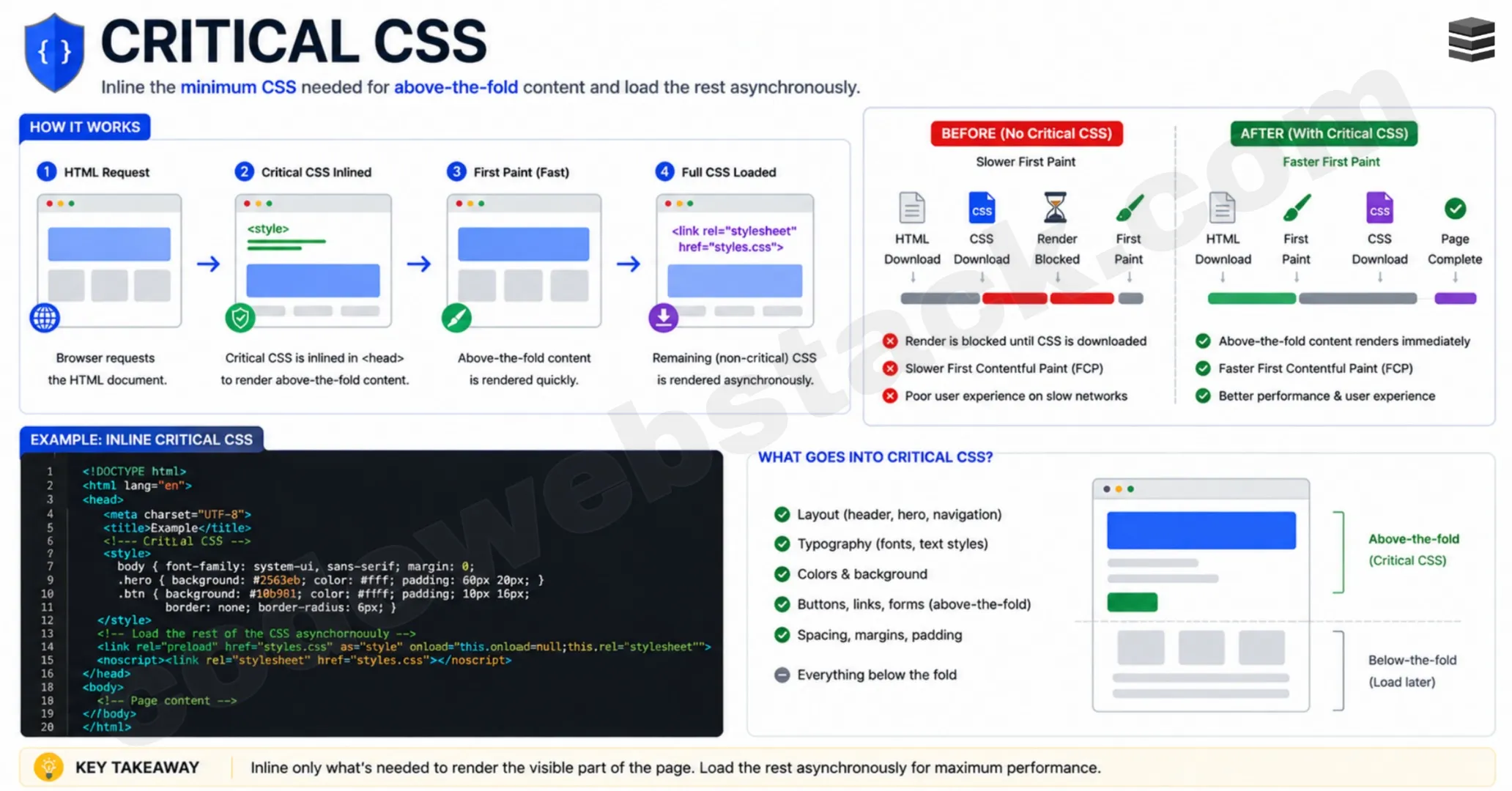
Understanding this concept helps you optimize rendering performance and is another important step in mastering how to become a senior frontend developer.
Essential State
Moving from performance to architecture, another key concept in understanding how to become a senior frontend developer is essential state.
Essential state is the minimum amount of data required to represent a UI. Most developers make the mistake of storing too much state. They try to store everything, derived values, computed data and UI states, which leads to complexity and bugs.
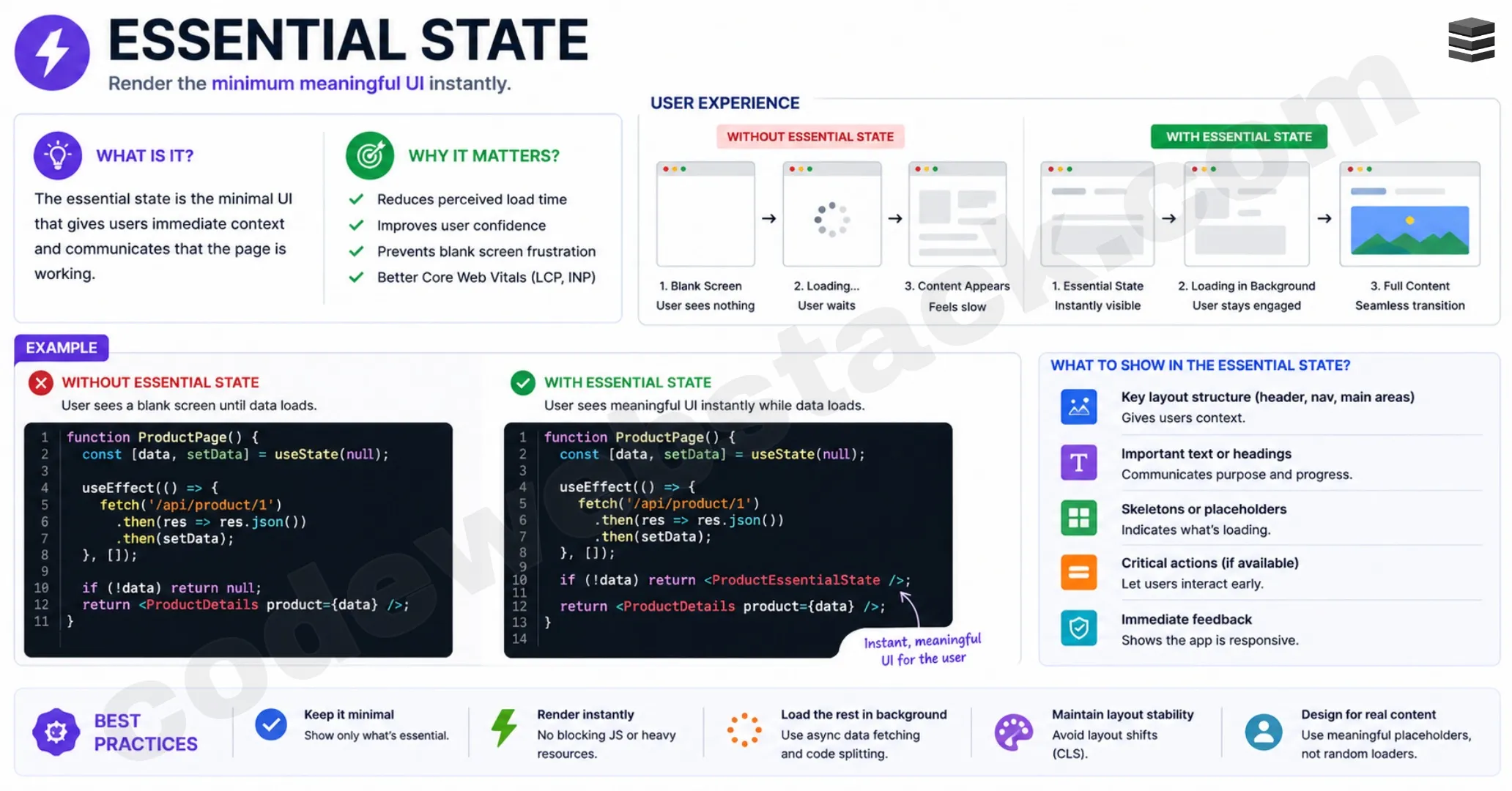
Senior developers think differently. Instead of storing everything, they store only the essential data and derive everything else.
For example, in an e-commerce UI:
Instead of storing:
- Original price
- Discounted price
- Total price
- Tax value
You can simply store:
- Product data
- Discount rate
- Tax rate
Everything else can be calculated dynamically.
Less state means:
- Fewer bugs
- Easier debugging
- Better performance
This ability to identify minimal data is what separates mid-level developers from those who truly understand how to become a senior frontend developer.
Also Read: Web Developer Salary Guide & Career Trends in 2026
Reducer Pattern
As applications grow, managing state becomes more complex. This is where the reducer pattern comes in, a core concept for anyone learning how to become a senior frontend developer.
The typical UI flow looks like this:
- User action
- State update
- Re-render
In small apps, this is easy to manage. But in large applications with multiple components and shared state, things become messy. The reducer pattern simplifies this by centralizing state updates into a single function.
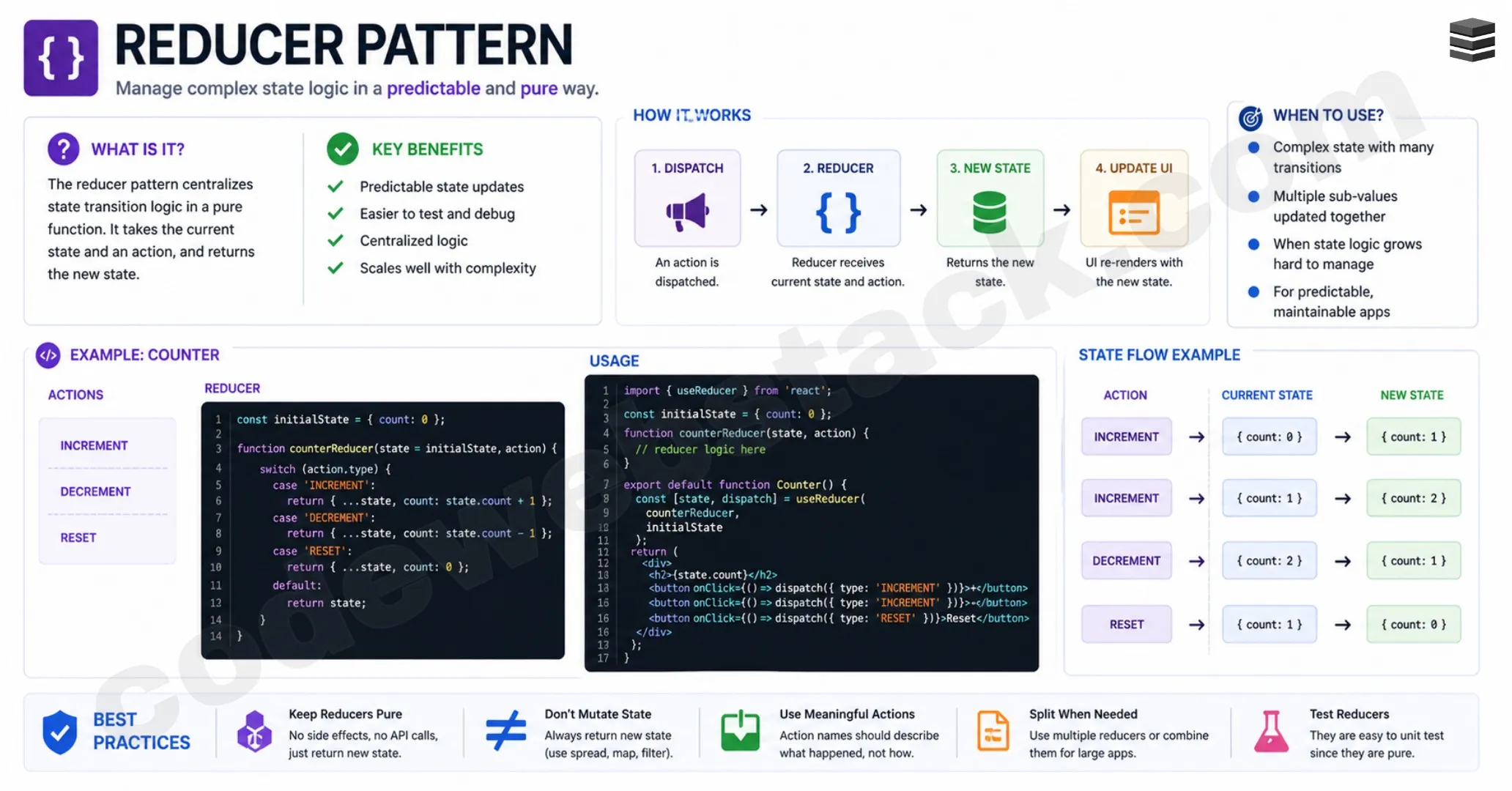
A reducer is a pure function that:
- Takes the current state
- Takes an action
- Returns a new state
This makes your application:
- Predictable
- Easier to test
- Free from side effects
Instead of updating state in multiple places, everything flows through one logic system. Libraries like Redux or React’s useReducer hook are based on this pattern, but the key is to understand the pattern itself, not just the library.
Senior developers focus on patterns over tools and mastering this is essential if you want to learn how to become a senior frontend developer.
Windowing (List Virtualization)
Another advanced performance concept you must understand when learning how to become a senior frontend developer is windowing, also known as list virtualization.
Modern applications often deal with large datasets, think of social media feeds, dashboards or infinite scroll lists. If you render thousands of elements at once, it puts heavy pressure on:
- DOM
- Memory
- CPU
This leads to slow rendering and poor performance, especially affecting metrics like Interaction to Next Paint (INP). Windowing solves this by rendering only the elements that are visible in the viewport.
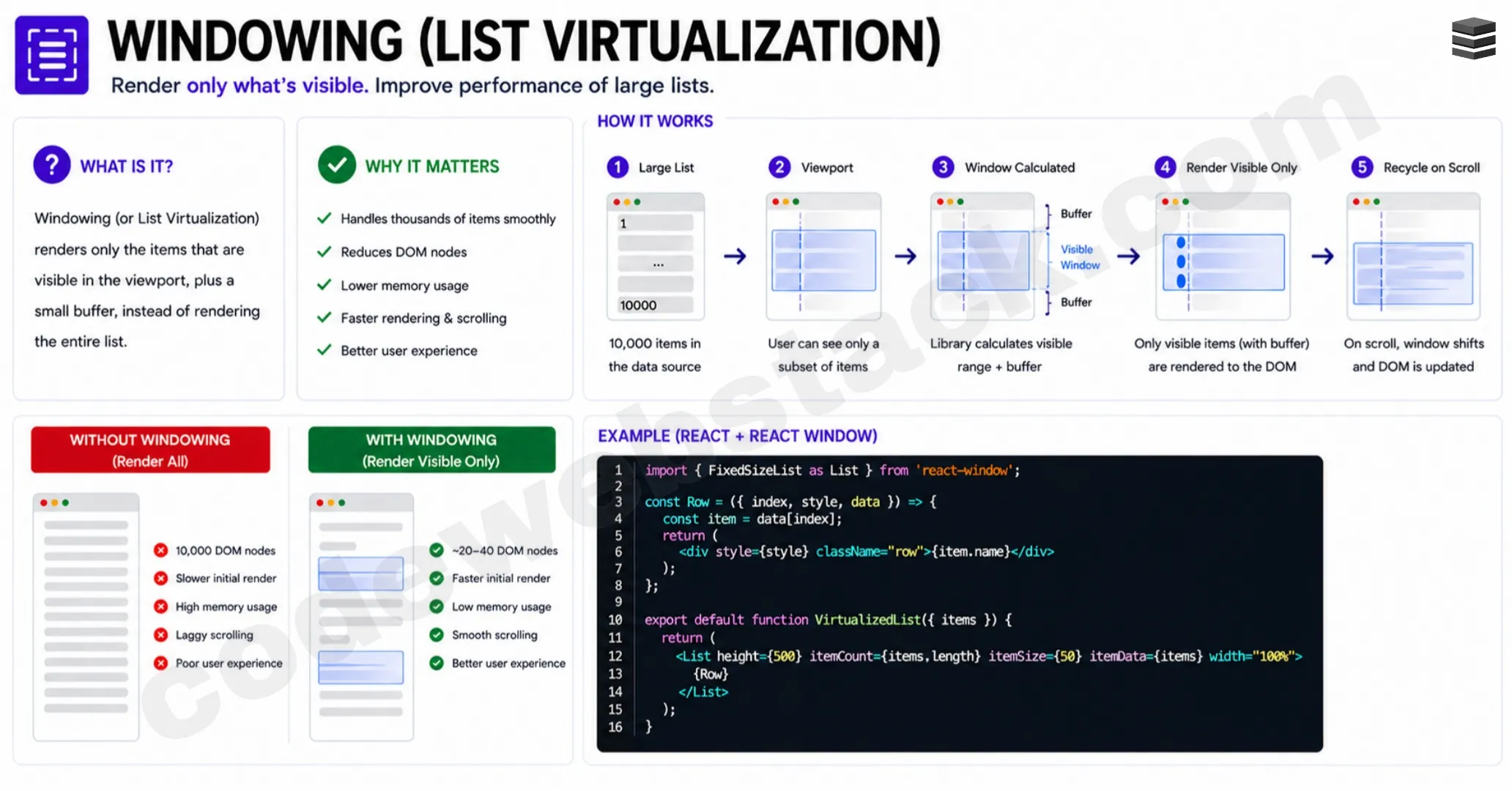
As the user scrolls:
- New elements are loaded
- Old elements are removed
This keeps the number of DOM nodes low and improves performance significantly. This is typically implemented using:
- Intersection Observer API
- Libraries like React Virtualized
Windowing is a common topic in frontend system design interviews and understanding it clearly is a strong indicator that you understand how to become a senior frontend developer.
Server-Side Rendering (SSR)
Another key concept to understand when learning how to become a senior frontend developer is server-side rendering (SSR).
In modern frontend applications, especially with frameworks like React, most rendering happens on the client side. The browser initially receives a minimal HTML file, often just a root div and then JavaScript takes over to render the UI.
This leads to a common issue known as the blank screen problem, where users see nothing until JavaScript finishes loading and executing. Server-side rendering solves this by generating the HTML on the server before sending it to the browser.
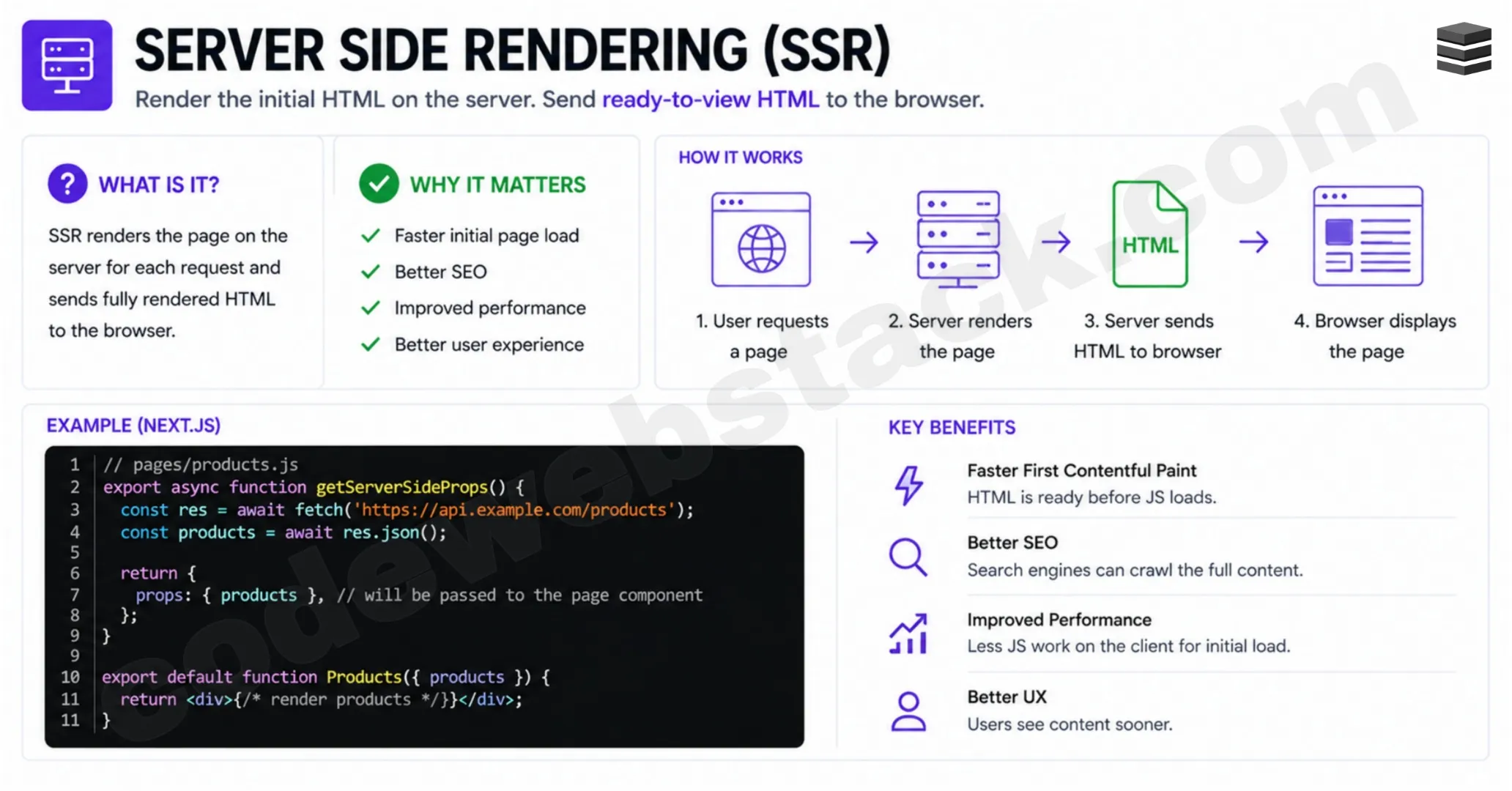
So instead of sending an empty page:
- The server renders the full HTML
- Sends it to the client
- The user sees content immediately
This significantly improves:
- Initial load performance
- SEO
- User experience
However, the page is not interactive yet, that’s where the next concept comes in. Understanding SSR is essential if you want to master performance and truly learn how to become a senior frontend developer.
Rehydration
Once you understand SSR, the next step in learning how to become a senior frontend developer is rehydration. It is the process of making server-rendered HTML interactive on the client side.
After the server sends fully rendered HTML:
- The browser displays it immediately
- Then downloads JavaScript
- Then attaches event listeners and state
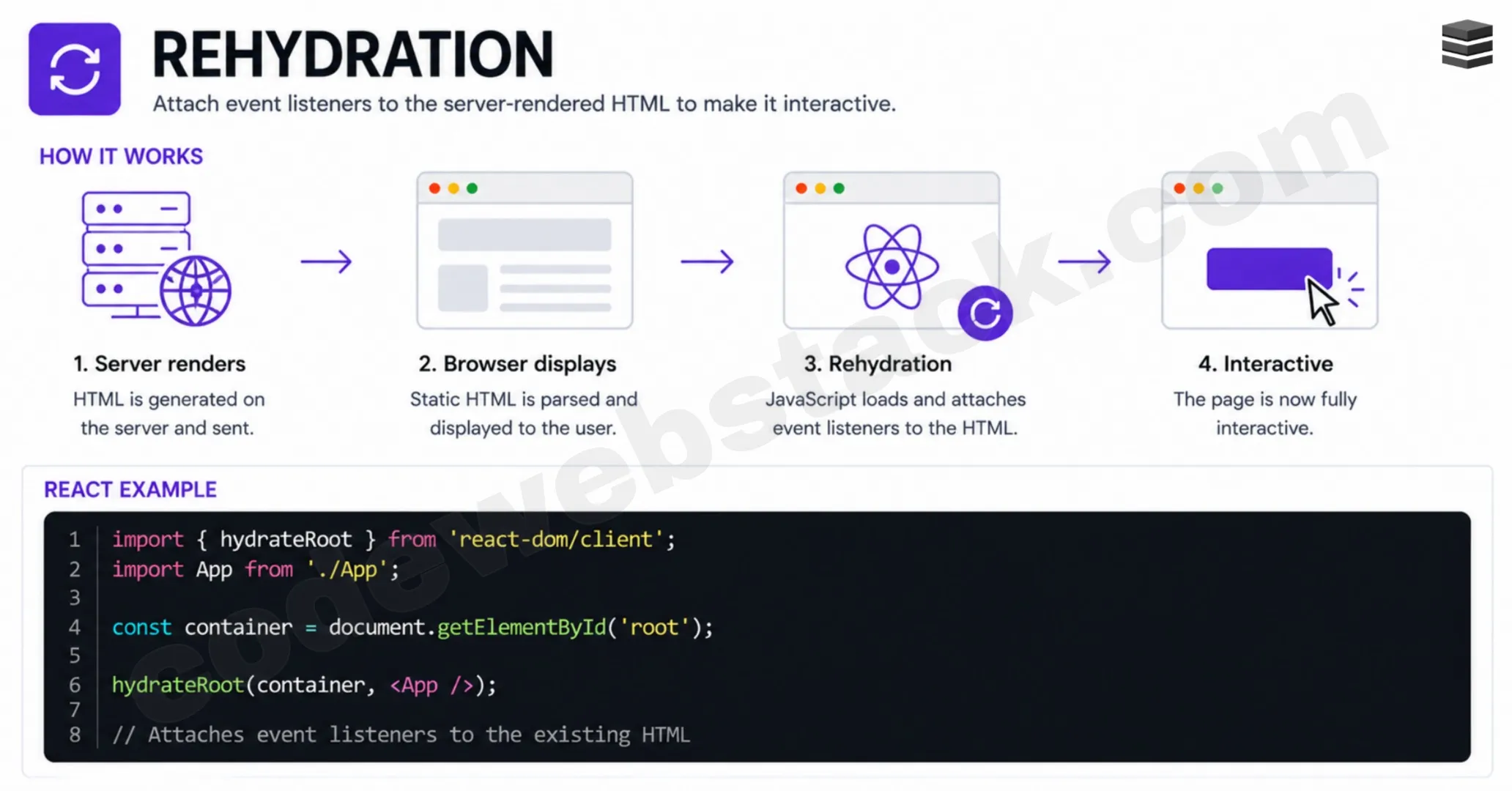
This is what makes the UI interactive. Without rehydration, the page would look complete but wouldn’t respond to user actions. However, rehydration comes with challenges:
- Hydration mismatches
- Performance overhead
- Complex debugging
Despite these challenges, it plays a crucial role in modern frontend frameworks. Understanding how SSR and rehydration work together gives you a deeper understanding of rendering strategies, a key part of mastering how to become a senior frontend developer.
Partial Pre-Rendering
Taking things further, another advanced concept in understanding how to become a senior frontend developer is partial pre-rendering. Instead of choosing between fully server-side or fully client-side rendering, partial pre-rendering combines both approaches.
In a single page:
- Static parts are rendered on the server
- Dynamic parts are rendered on the client
This allows you to:
- Improve performance
- Reduce unnecessary JavaScript
- Maintain interactivity where needed
Modern frameworks like Next.js use this approach to optimize rendering automatically.
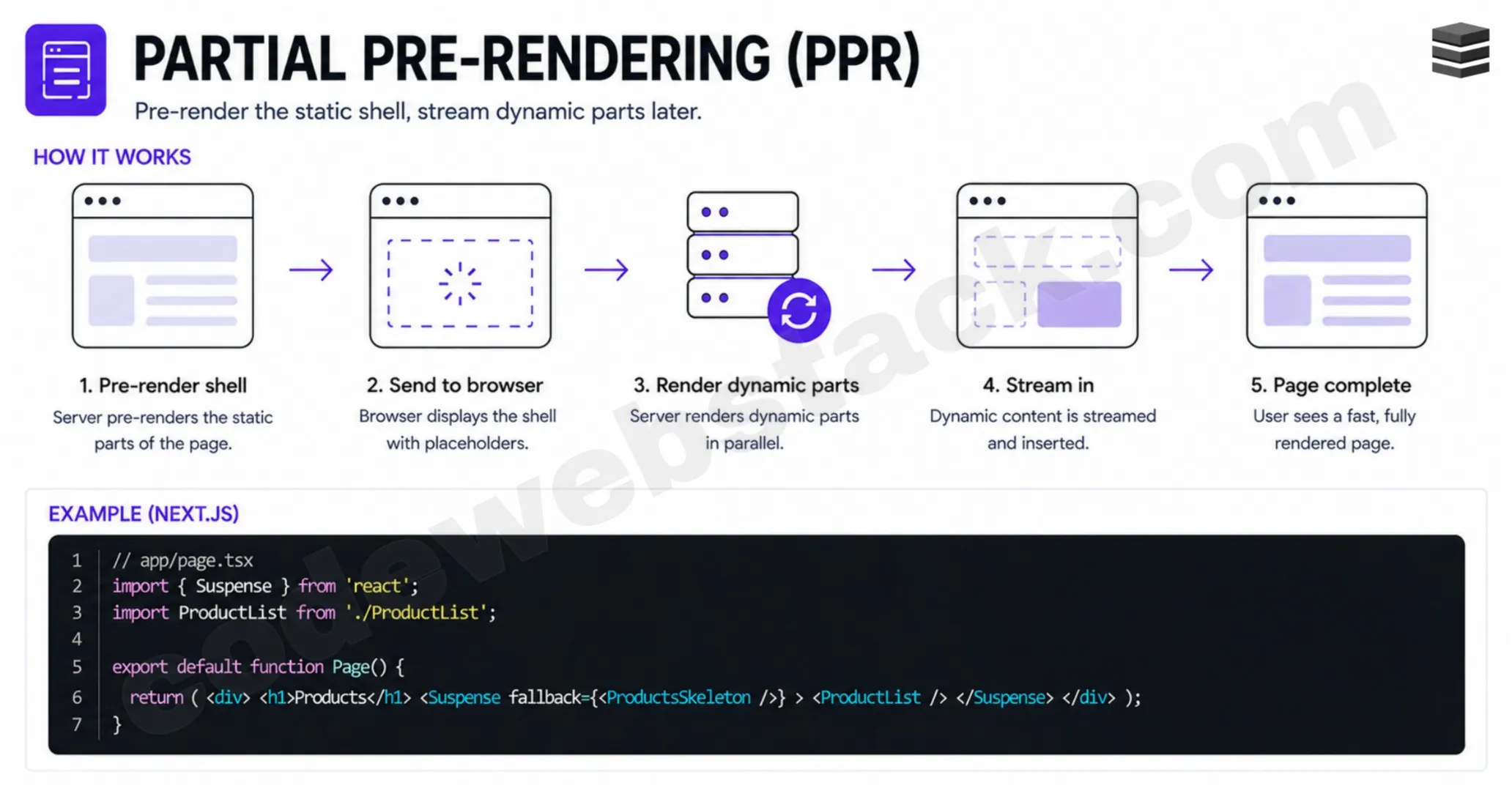
For example:
- Product details – pre-rendered
- User-specific data – rendered on client
This hybrid approach is powerful but adds complexity. Understanding when and how to use it is what differentiates experienced developers from those still figuring out how to become a senior frontend developer.
Server-Side Components
Another modern concept you need to understand when learning how to become a senior frontend developer is server-side components.
In traditional frontend architecture, all components are sent to the client along with JavaScript, even if they don’t require interactivity. Server-side components change this approach. They allow you to:
- Render non-interactive components on the server
- Send only HTML (no JavaScript)
- Reduce bundle size
Only interactive components are sent with JavaScript and hydrated on the client. This results in:
- Faster load times
- Reduced JavaScript execution
- Better performance
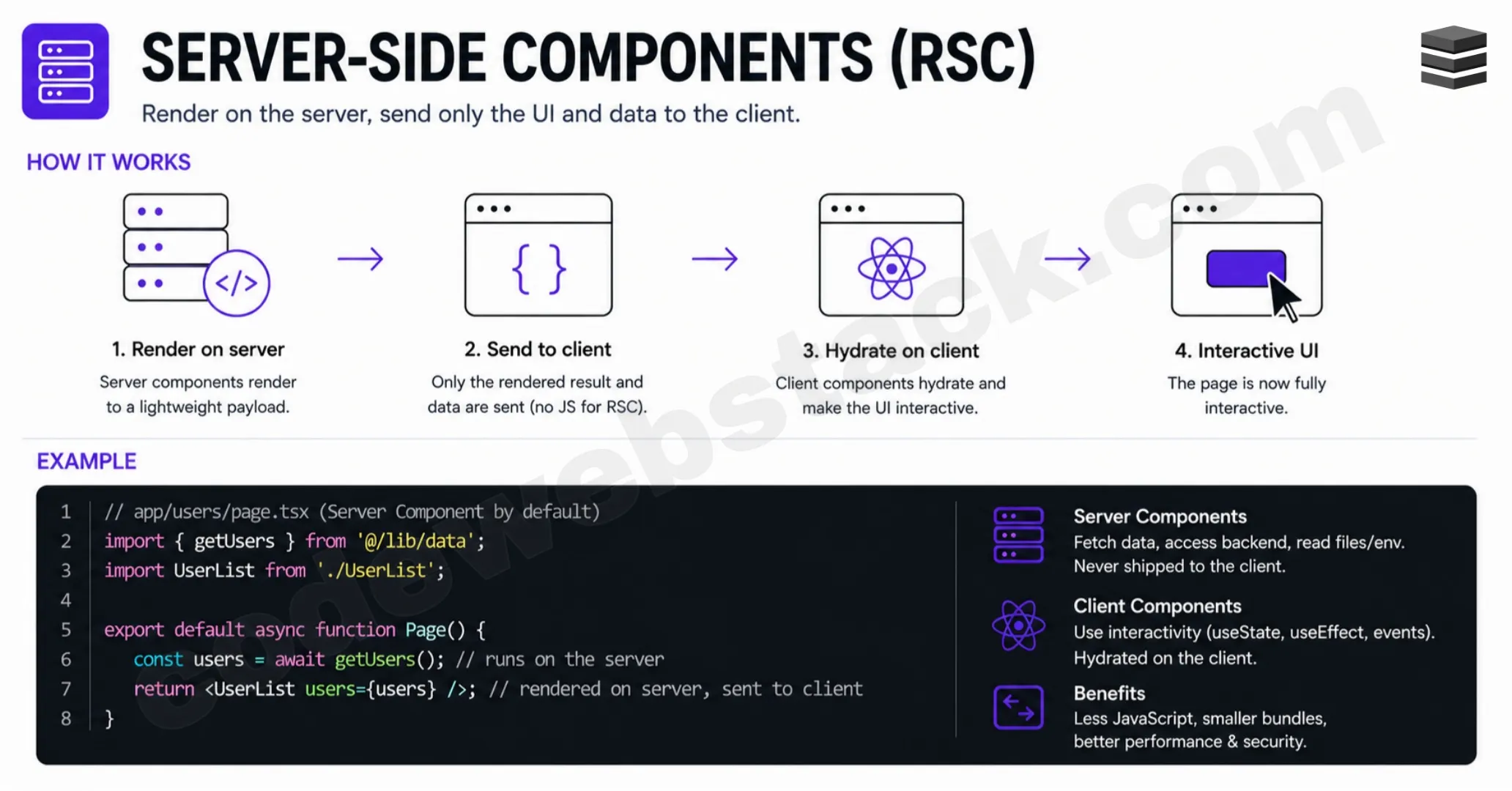
Frameworks like Next.js (React Server Components) are already implementing this concept. Understanding this helps you build more efficient applications and is an important step in mastering how to become a senior frontend developer.
Micro Frontends
The final concept in this roadmap for how to become a senior frontend developer is micro frontends.
As applications grow, managing a single large frontend codebase becomes difficult. Teams become larger, deployments slow down and coordination becomes complex. Micro frontends solve this by breaking the frontend into smaller, independent applications.
Each part of the UI can be:
- Developed independently
- Deployed independently
- Managed by separate teams
For example:
- Navbar – one app
- Dashboard – another app
- Product section – another app
All of these are combined using a shell application that manages:
- Global state
- Authentication
- Theme
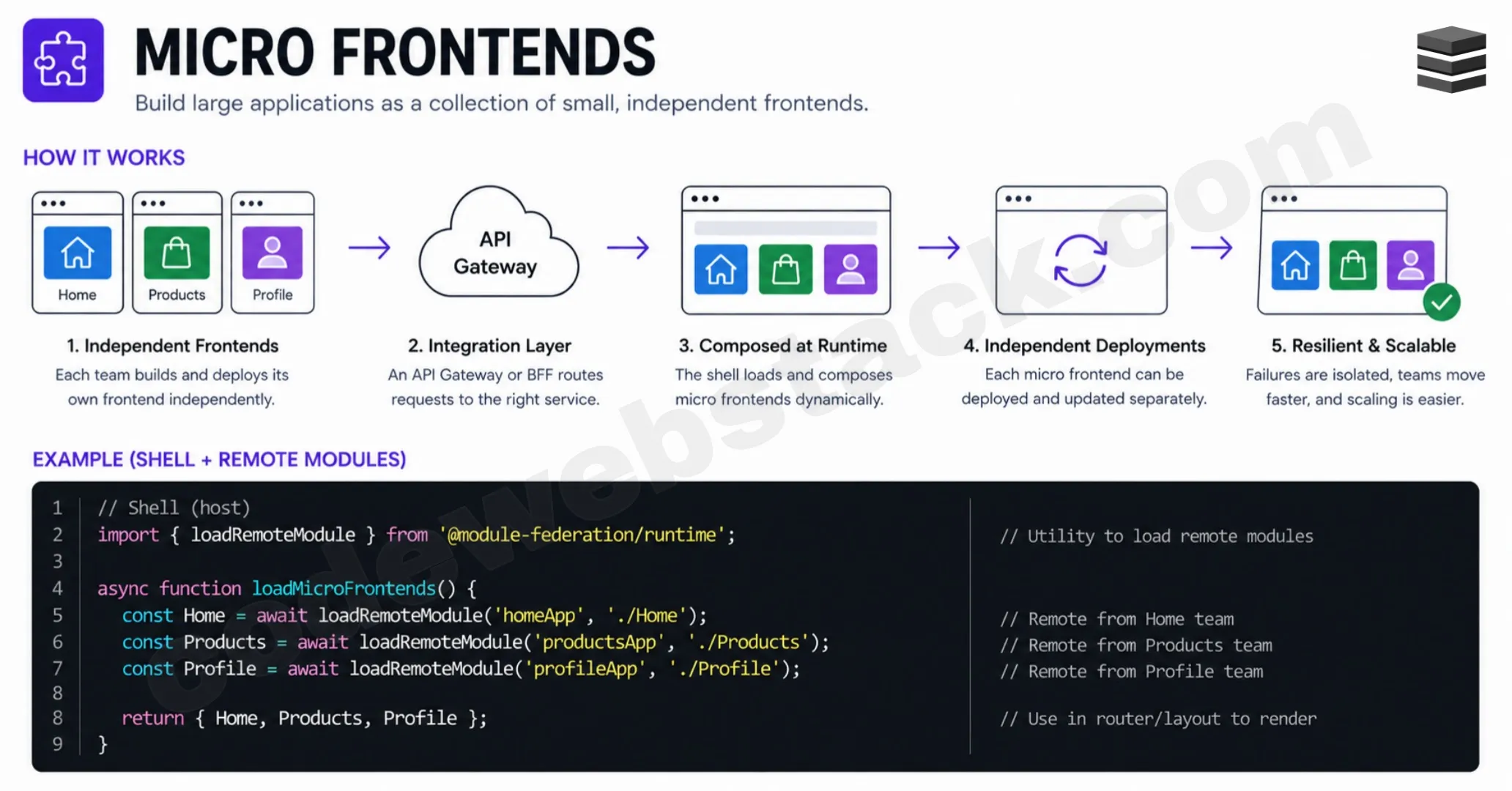
This architecture allows teams to scale development efficiently. However, it comes with trade-offs:
- Increased complexity
- Performance overhead
- Integration challenges
Micro frontends are typically used in large-scale applications and understanding them shows that you think beyond components, a strong indicator that you understand how to become a senior frontend developer.
Conclusion
Becoming a senior frontend developer is not about learning more frameworks, it’s about understanding how systems work. From rendering and performance to state management and architecture, these 15 mental models form the foundation of modern frontend development.
If you truly understand these concepts, you won’t just clear frontend interviews, you’ll build scalable, high-performance applications and most importantly, you’ll finally understand how to become a senior frontend developer.
FAQs
How to become a senior frontend developer?
To become a senior frontend developer, you need to master core concepts like the critical rendering path, Core Web Vitals, HTTP caching, lazy loading and frontend architecture. It’s not about frameworks, but understanding how the browser, performance and state management work together.
What skills are required for a senior frontend developer?
A senior frontend developer should have strong knowledge of JavaScript, browser rendering, performance optimization, state management, system design and modern frameworks. Understanding frontend mental models is equally important.
What are frontend mental models?
Frontend mental models are core concepts that explain how web applications work internally, such as rendering, caching, data flow and architecture. These help developers think like senior engineers rather than just writing code.
How long does it take to become a senior frontend developer?
It typically takes 3–5 years of consistent practice, but the timeline depends on how deeply you understand core concepts like performance, rendering and system design.
What is the critical rendering path in frontend development?
The critical rendering path is the process the browser follows to convert HTML, CSS and JavaScript into pixels on the screen. It includes steps like parsing, styling, layout, painting and compositing.
Why are Core Web Vitals important?
Core Web Vitals measure real-world performance of a website, including loading speed (LCP), responsiveness (INP) and visual stability (CLS). They directly impact user experience and SEO rankings.
What is lazy loading in JavaScript?
Lazy loading is a technique where resources like images or JavaScript files are loaded only when needed. This improves performance and reduces initial load time.